Posts

Generate password for altool and upload build (ipa) to TestFlight and using altool
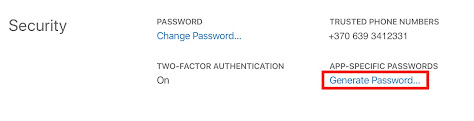
Image
Login to https://appleid.apple.com/   Generate APP-SPECIFIC PASSWORD Save generated password as later it will not be able to view and edit Use generated password in the altool . Example:   xcrun altool --validate-app -f best/my/app.ipa -u username@mail.com -p "APP-SPECIFIC-PASSWORD" Notes: After changing users password all app specific passwords will be revoked. 

Xcode Server build number incrementation

Image
To increment build number in the Xcode Server I am using  Set: Current Project Version = 1 and Version System = Apple Generic . Can be found more in Apple documentation .  Right click on the bot and choose Edit Bot...   Open Triggers  tab and add Pre-Integration Script  Give a name  (example: Set Build Version) and write script:  # Change directory to project path   cd $XCS_PRIMARY_REPO_DIR  # Set build version same as integration number xcrun agvtool new-version -all $XCS_INTEGRATION_NUMBER  
git auto-completion: Open .bash_profile: vi ~/.bash_profile Add script execution lines: if [ -f ~/.git-completion.bash ]; then   . ~/.git-completion.bash fi # Git branch in prompt. parse_git_branch() {     git branch 2> /dev/null | sed -e '/^[^*]/d' -e 's/* \(.*\)/ (\1)/' } export PS1="\u@\h \W\[\033[32m\]\$(parse_git_branch)\[\033[00m\] $ " #End Git branch in promt.
TextMate support for git commit command: Open .bash_profile: vi ~/.bash_profile Insert command to support TextMate: # ------------------------ # TextMate support for git export PATH="$HOME/bin:$PATH" export EDITOR="$HOME/bin/mate -w" # End TextMate support for git # ----------------------------

symbolicatecrash from terminal

Put *.crash, *.dSYM and *.app file to one folder. After that execute symbolicatecrash method as shown below: symbolicatecrash -v crash.crash > Symbolicated.crash Xcode 8:  /Applications/Xcode.app/Contents/SharedFrameworks/DVTFoundation.framework/Versions/A/Resources/symbolicatecrash Xcode 7:  /Applications/Xcode.app/Contents/SharedFrameworks/DTDeviceKitBase.framework/Versions/A/Resources/ symbolicatecrash

FFMPEG

Print out media metadata:  ffprobe -v quiet -print_format json -show_format -show_streams output1200x900.mov {     "streams": [         {             "index": 0,             "codec_name": "prores",             "codec_long_name": "ProRes",             ...         },         {             "index": 1,             "codec_name": "aac",             "codec_long_name": "AAC (Advanced Audio Coding)",             ...         }     ],     "format": {         "filename": "output1200x900.mov",         "nb_streams": 2,         ...     } }...

Open SSL

Save certificate: openssl s_client -showcerts -connect server.edu:443 </dev/null 2>/dev/null|openssl x509 -outform PEM >mycertfile.pem

Git points to wrong bin

Search for installed git paths. sudo find / -name git List of gits in my machine. /Applications/Xcode.app/Contents/Developer/usr/bin/git -> git version 1.9.3 (Apple Git-50) /opt/local/bin/git -> git version 1.7.9.2 /usr/bin/git -> git version 1.9.3 (Apple Git-50) /usr/local/git/bin/git -> git version 2.0.1 Places where to change $PATH vi ~/.bash_profile vi ~/.profile After execution of this line default version for git will be 2.0.1 export PATH=/usr/local/git/bin:$PATH

Free UI Stuff

Textures:  http://www.texturemate.com Useful UI stuff like polaroid frames, fire and other:  http://www.fuzzimo.com/archives/

Color Palette Generators

CSS Drive: http://www.cssdrive.com/imagepalette/index.php Degraeve: http://www.degraeve.com/color-palette/index.php Patorjk:  http://patorjk.com/color-palette-generator/ Color Scheme Designer:  http://colorschemedesigner.com/#

Tools to design app/web apps

Image
Justinmind have a nice design tool under the name Prototyper. It is possible to get Prototyper Free Edition and Prototyper Pro Edition.  Pro edition costs $495.   http://www.justinmind.com/ The Pencil Project's unique mission is to build a free and opensource tool for making diagrams and GUI prototyping that everyone can use. It is possible to download and install additional plug-ins (stencils) from here . http://pencil.evolus.vn/en-US/Home.aspx    Balsamiq is a small group of passionate individuals who believe work should be fun and that life's too short for bad software. This application is not for free. A Single User License – $79. Trail period 7 days.   http://www.balsamiq.com/ Other tools: Framer - Modern prototyping tool  Indigo Studio - Rapid, interactive prototyping  Mockingbird - Wireframes on the fly  Simulify - Interactive, shareable wireframes, mockups and prototypes  Solidify - Create clickable pr...

iTunes Links

With iTunes links you can provide your customers with an easy way to access your apps on the App Store directly from your website or marketing campaigns. Creating an iTunes link is simple and can be made to direct customers to either a single app, all your apps, or to a specific app with your company name specified. - To send customers to a specific application:   http://itunes.com/apps/appname - To send customers to a list of apps you have on the App Store:   http://itunes.com/apps/developername - To send customers to a specific app with your company name included in the URL:   http://itunes.com/apps/developername/appname - To create wigets: http://widgets.itunes.apple.com/builder/

iOS devices resolutions

iPad 3 2048×1536 px iPad 2 & iPad 1 (1st & 2nd generation) 1024×768 px iPhone 4S & iPhone 4 640×960 px iPhone 3 & iPhone 3G & iPhone 3GS 320x480 px iPod (1st, 2nd & 3rd generation) 480×320 px iPod (4th generation) 960x640 px ----- iPad Launch Image Orientations To deal with various orientation options, a new naming convention has been created for iPad launch images. The screen size of the iPad is 768×1024, notice in the dimensions that follow the height takes into account a 20 pixel status bar. Filename Dimensions Default-Portrait.png * 768w x 1004h Default-PortraitUpsideDown.png 768w x 1004h Default-Landscape.png ** 1024w x 748h Default-LandscapeLeft.png 1024w x 748h Default-LandscapeRight.png 1024w x 748h Default.png Not recommended If you have not specified a Default-PortraitUpsideDown.png file, this file will take precedence. ** If you have not specified a Default-LandscapeLet.png or Default-LandscapeRight.png image file, this file w...

ADB (Android Debugging Bridge)

Installing and uninstalling apk adb install <apk file> adb uninstall <package name> Example: adb install /Users/Documents/Android/MyApk.apk adb uninstall lt.rj.name

Useful git commands

Rollback/remove commits If we have log like shown below. And we want to remove commit with name <commit_sha1>. git log  commit <commit_sha1>  ...  commit <commit_sha2>  ...  Then we could execute this lines: git rebase -i HEA D ^^  or git rebase -i <commit_sha2> Rollback file You can quickly review the changes made to a file using the diff command: git difftool <commit_sha> <file_name> -y git diff <commit_sha> <file_name> Then to revert a specific file to that commit use the reset command: git reset <commit_sha> <file_name> Then commit the change: git commit Then checkout latest version for the file: git checkout <file_name> git: undo a merge?  After executing this command our master branch will look identical to origin/master: git reset --hard origin/master With git log we can check which commit is one prior the m...

File encoding in OSX

Encoding Type For File Using the -I (that's a capital i) option on the file command seems to show the file encoding. file -I {filename} Encoding Conversions For File Convert from one file type to another using the following command: iconv -f original_charset -t new_charset originalfile > newfile e.g. iconv -f utf-16le -t utf-8 file1.txt > file2.txt